When FX is mentioned, this is definitely one of those that immediately come to mind. Explosions are exciting, awe-inspiring and fun. There's quite an art to animating an explosion with any level of complexity, so in this article we'll be dismantling and reassembling the effect to see what makes it tick.
The best part is that with some fire, smoke, contrast and ignition experience under your belt, you're well-prepared to dive in head first.
The sudden outward release of energy due to a chemical reaction or buildup of pressure. Man-made explosions, whether deliberate or accidental, usually involve detonation, which is a small explosion or reaction that sets off the larger one. Dynamite explosion and gas explosion are examples of this. There are many types and designs of explosion in science and nature but this lesson covers a generic smoky type to get you started.
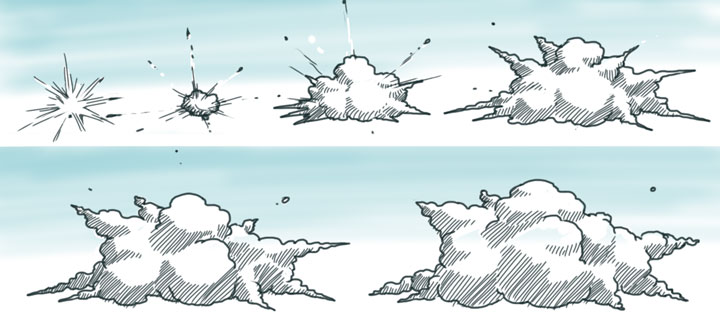
Fig. 1 - a fairly standard explosion of the billowing, smoky variety
The big smoky part of an explosion is merely the evidence of destruction that has already occurred. Explosions without smoke contain the same evidence but in a different way, like in the excellent Slow-Mo Guys video below where water is violently displaced, instead of smoke or dust.Like every other effect, designing explosions means figuring out the look and behaviour of its various aspects. Starting with the type of explosion, you should design the various stages, starting with detonation and ending with the dissipation, or end of the scene.

Fig. 2 - a. Detonate; b. Develop; c. Settle; d. Dissipate
The behaviour of the effect is a design consideration. For example, whether the smoke clouds roll, spin or simply hang and dissipate. I mentioned this in lesson 0403, but a cheap, effective way to end an explosion is to fill the screen to black, then either dissipate off or cut/wipe/reveal to the next scene. It's like taking a breather from the heavy workload of a fully animated smoky explosion.
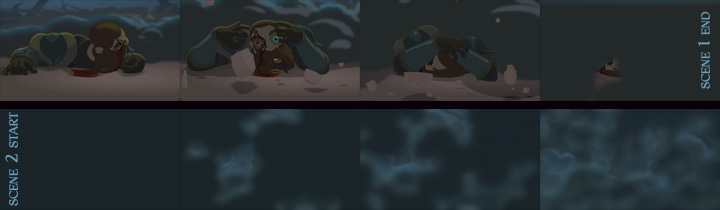
Fig. 3 - Explosion develops to obscure
scene 1; Then dissipates to reveal scene 2
In the contrast article you saw how to give impact to a flash effect and there was a brief mention of explosions. The detonation of an explosion is the bright flash part to which you'd apply that impact formula, which can be magnified or exaggerated for larger scale explosions.
Simple cartoon explosions are quite effective with just clever use of colour and no layering. However, you can add a ton of fiery realism if you simply separate the detonation flash from the smoke itself, as the two are best treated separately.
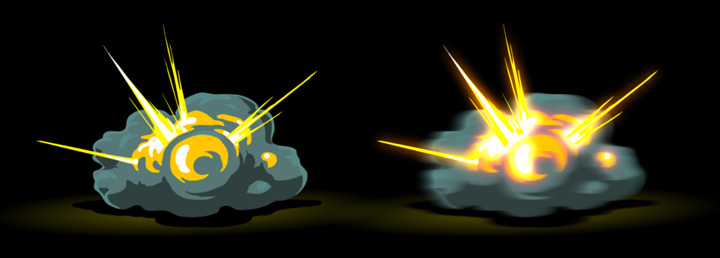
Fig. 4 - Separate layers allow separate treatments
Suppose an explosion doesn't displace dust, debris or water. It may simply be a gas ignition that explodes into ball of fire which quickly dissipates. This would be one of the easier types of explosion to animate because it's all over so much quicker.
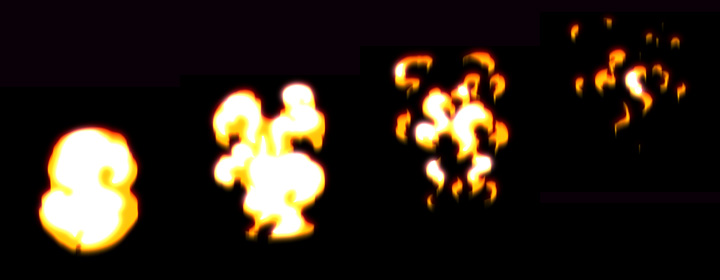
Fig. 5 - Gas fireball explosion dissipates quickly
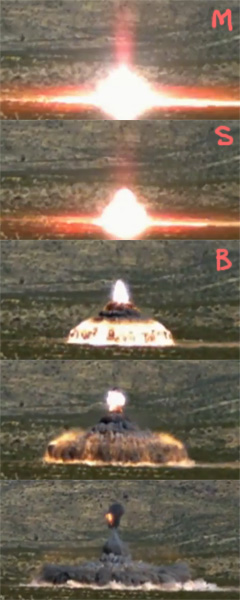
More often than not, a thick smoke explosion generally needs a two-tone cloud effect to really show the volume of the clouds. Without it, the explosion will appear flat and cartoony. The designs in Figure 1 at the top of this page clearly illustrate volume using shaded areas. It's the beginning of an explosion sequence from the detonation to the development of the billowing smoke clouds. Note the m-s-b timing formula is used, which you learned in Lesson 15: Contrast.
As you can see in Figure 6, the m-s-b timing formula isn't just an animation trick. It's a very real feature of a detonation flash. These images are taken from the video reference for shock waves, seen below.
Thanks to video found easily on the web, we don't have to risk our lives to witness a powerful explosion. The most awe-inspiring footage clearly shows the shock wave, which is a fun characteristic to put into your animated explosions. If the shock wave is to be a feature of your animation however, we need to really slow it down and exaggerate it. As this phenomenon is essentially a spherical wall of air pushed violently away from the explosion, it's almost invisible and generally too quick for the eye to see (see video below).
This effect can be achieved in a number of ways depending on the software or methods you're using. I'll refer once again to my FX-heavy Dragon Age Legends trailer in which I used a refraction effect for a magical shock wave (Figure 7). It's only visible because it's warping the scene character and background.
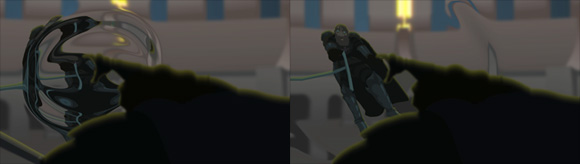
Fig. 7 - Colourless shockwave using refraction.
This invisible treatment is pretty much exactly what you see in any shock wave footage, but an effective shock wave can also be achieved with feint white, like a ring of vapour expanding rapidly outwards.
Galactic shock waves are a fun example of the visible ring style. In VFX it's very common to see them designed as a disc-shape expanding out from an exploding star, planet or ship.
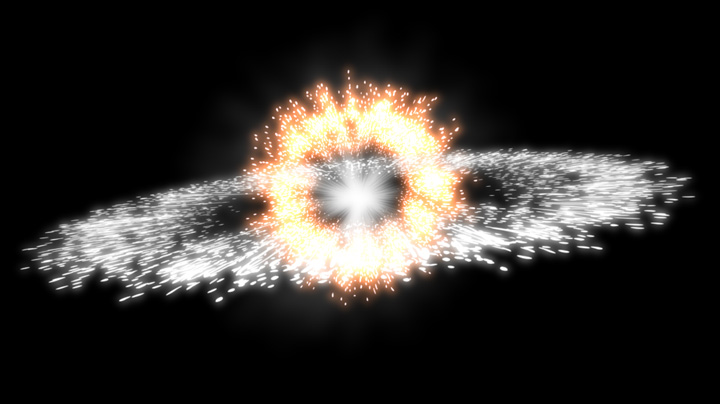
Fig. 8 - Galactic explosion with a common disc-style shockwave
In order to keep things simple for your start in complex explosion animation, we'll avoid adding the extra layers of dust and debris for now. Needless to say that these features really fill out the effect and demonstrate a higher level of destructive power. In an explosion scene, flying debris looks great when it's followed by a trail of smoke, but those trails look just as good without actually animating the debris.
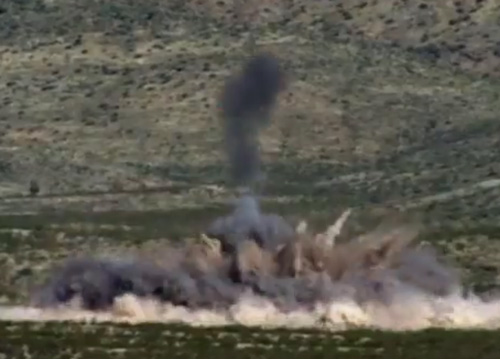
Dust can be thrown upward from a shock wave, mixing with the smoke of the explosion. This is another level of complexity that we'll skip over for now. Needless to say that, as you can see in Figure 9, there are separate colours that will at first be clearly defined, but it becomes increasingly difficult to manage as the dust and smoke clouds and colours mix
Figure 9 (right) is taken from the previous shock wave video, so watch that a few times if you want to get a feel for not only how smoke and dust are thrown up, but also how they differ in their dissipation.
A very advanced cloud effect is the mushroom shape of a fully developed explosion. We'll cover it in a future article but in the meantime feel free to track down some reference video and study the way it rolls. It's very time consuming and very difficult to animate by hand, but can be a truly stunning effect in any 2D project.
The video below is of course very silly but it is a good clear demonstration of a mushroom cloud developing and rolling. With many intricate areas of light and shadow, you can see why it's such a complex effect to animate in 2D.
When animating an explosion, the easiest part is generally the chaotic detonation flash and the first few keys of cloud development. Most of the really hard work is when the smoke clouds are developed and slow down, billow and roll.
The detonation flash is very fast, then the whole thing slows down to very slow. This is where we'd mix the straight-ahead style of animation with the pose-to-pose method. In the videos below, I demonstrate keying out movement and timing for a full smoky explosion, as well as the thought process behind the fiery layer within the smoke.
video 30_anim
You know enough about fire, smoke and light effects from the previous articles that we don't need to talk about how to treat an explosion. The basics of layering for separate colourstyling and treatment apply to all effects. The more elements can separate onto their own layers, the finer the control you'll have over how it all looks in the end.
For example, if you draw rocks and stones amongst your smoke clouds on the same layer, it will severely limit how you can treat that layer with blurring or transparency.
When handled well, explosions are impressive to the audience. For you, the animator, it's a very satisfying moment when you put that finishing touch and can finally say "I've done it!".
Conquering any effect is inspiring, so ensure you stay inspired by successfully animating simple scenes first! The very best way to master effects is to build your confidence with small, uncomplicated stuff. If you try to take on huge intricate explosions before you're comfortable with an easy one, it's likely to demoralise and frustrate you.
Remember, break it down into simple individual tasks and you'll enjoy it more. Good luck!