Not all effects are elemental phenomena. When most people think of FX animation, swarming behaviour is an aspect that is very often overlooked. This effect encompasses not only swarms, but any number of creatures that move as a group, including flocks and schools. This time we're starting relatively simple by animating a cloud of swarming dots.
Creatures swarm for a variety of reasons. The most obvious is for defence; for example wasps defending a nest. When it comes to flocks and schools it's generally about safety in numbers.
Some insects swarm around their home, but otherwise spend a great deal of time out alone in the world doing their duty. Bees are an example of this. The hive seems to be a single living thing because it's the heart of the bee's world, but each is constantly coming and going.

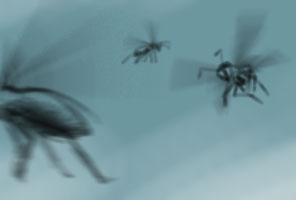
Whatever the type of swarm, they all behave in unique ways. For example,
when you compare a swarm of wasps to a flock of birds, you can easily see
how they differ in behaviour.
Firstly, the size of the creature plays a key role in how it moves. A wasp
is capable of hovering and darting with a high degree of manoeuvrability.
It has very little mass and therefore momentum, so it can seemingly turn
on a point and dart in the other direction. A bird on the other hand,
depending on its size, will need a larger area in which to turn. You may
have seen a flock of birds changing direction, the impressive way that it
wheels around in a large arc.
Secondly, a wasp swarm seems to be mostly about defence and patrol. While a flock of birds is more about travelling somewhere. So while a patrolling wasp might follow his own set of internal instructions, a bird is following, leading or otherwise sticking with the flock as they move together.
Flocks and schools have their own type of unique movement, but swarming behaviour is an ideal start so that's what we'll study in this lesson.
Depending on the type of swarm, the overall swarm shape will be a design consideration. A lazy drifting swarm around a hive will have a completely different design to a directional, aggressive swarm on the attack. In the video below, I'm designing a few different swarms.
video 27_design1
Even though the swarm feels like a single entity, it matters that the individual particles are animated well. So the video below discusses how a single particle might look depending on what it's doing at any given time.
video 27_design2
Referring to the designs demonstrated earlier, let's do a couple of swarms. One will be a lazy cloud of moon flies, and then we'll make an aggressive swarm of attacking wasps.
In the video below, I'm creating the peaceful swarm of lazily wandering thingies.
video 27_lazy1
The lazy swarm generally takes place in a single location, like a hive. Now let's move on to something a little more mobile.
While the lazy swarm generally takes place in a single location and doesn't exactly need its shape keyed out, the mobile swarm will need first key-posing as a single, ghostly entity. After that we can start on the individual particles.
video 27_aggressive1
video 27_aggressive2
With a bit of practice you'll find that animating this kind of speck swarm gives you results quickly and easily. It's a satisfying thing to see how much progress you can make in just a few minutes. Flocks and schools are more difficult because each "particle" is more than a mere dot, or streak. However, some experience in animating simple insect swarms will prepare you for more later in the course.
I mentioned earlier that you see a lot of this kind of swarm through my Brackenwood series. I also mentioned that with swarms, we can do things that coded simulation swarms cannot. Here's a scene from "The Last of the Dashkin". The onion skin is turned on, showing the complete path traced by the gnats. Find the secret yet?
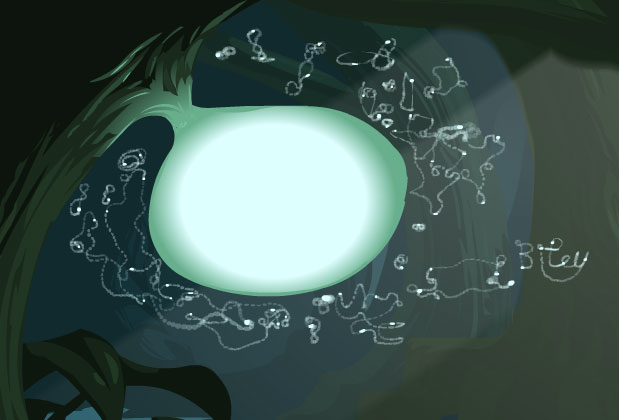
Fig - 1. Maybe this can be done in a simulation, but I bet I did it quicker!