No matter how much FX experience you have, liquid animation is hard. There's no more direct way to say it and no easy way to animate it. Liquids are some of the most difficult effects you'll ever have to animate. It's very specific in its rules, and mastery involves a deep understanding of several individual physical aspects. These include wave motion, gravity, surface tension, light and reflections.
Oh, hey guess what... we've covered all of those in previous articles!
In the droplet article we saw an impact on a surface which led to small volumes of water being thrown up into the air. This article is all about a larger impact, which means a larger volume of airborne water and how it behaves as it goes through its stages of breaking up and returning to the surface.
Liquid thrown upward by an impact. Rising to form liquid "walls" which transition through stages of sheets, fragmenting into strings and finally, breaking up into beads.
In the video below, we look at these basic stages of airborne water.
As well as the behaviour we've just seen, many separate principles that we've already covered in this course are constantly acting on water and it's all much more obvious in the air. When you animate a basic water splash, you animate liquid and light under the effects of gravity and surface tension.
Liquid is a beautiful effect. Curvy. Flowing. Intricate. Full of life and light. When we animate a splash though, we're concentrating on the movement of the shapes. In this section we're looking at the linework that defines the outline of the splash. We will add light and colour in the Treatment section below.
Airborne water behaves in a very specific way, due almost entirely to the phenomena of gravity and surface tension. The shapes formed by bodies of free falling liquid are unmistakable in their design.
Before you start animation, it's a good idea to design the milestones of the splash's development. In the video below, I'm designing for 5 basic stages of the splash;
Now let's look at some variations on a standard splash. In the video below, note how each splash design begins with just a few directional lines.
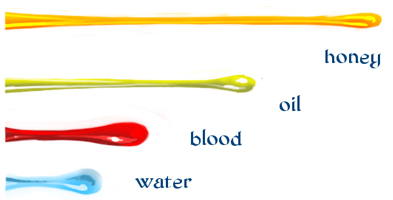
Fig. 1 - Thicker liquids stretch further before breaking
The design and timing of a water splash are very different to those of a mud splash. Honey, oil, blood and cream are other liquids that have slightly different design and timing concerns due to their surface tension.
When designing thicker liquids, keep in mind the stronger surface tension means that volumes will stretch further before breaking into beads.
If you were to animate a honey splash, the impact would need to be very hard to break the honey up. The entire splash may never get past the strings stage! Of course the surface tension of honey is an exaggerated example but one well worth experimenting with.
As beautiful as it is in real life, liquid is an effect that loves to be stylised. From flowery shapes, to fantastic colouring or flame-like movement, liquid doesn't need much coaxing to appear magical. As demonstrated in the previous designs video, you can have a lot of fun posing liquids into almost any shape you like. Just one reason why liquid is so well suited to magic FX animation.
When animating a water splash, remember that realistically, EVERY piece of water, every sheet and droplet must have its own trajectory with the exact same forces working against it.
As we saw in the design section, the first drawing of a splash, the initial impact, is full of energy and direction as the liquid sheet is cast clear of the surface. The sheet's upward momentum reaches a peak before gravity brings it back to the surface.
In the splash of a small stone the timing is relatively simple for an experienced animator. For a scene of this scale, the sequence is remarkably fast with just a few drawings. It's only the huge scale, or ongoing splashes (swimming splashes) that one would truly consider tedious or nightmarishly complex. Even so, a poorly executed water splash can appear amateurish or simply cheap, so it does take persistent practice to develop the skill.
The video below demonstrates the entire rough animation process. It's mostly in real time so settle in for about an hour, or watch the time lapse version here on YouTube.
A lazy effects animator will simply reduce each droplet to nothing in the air, conveniently avoiding the work of bringing it through its natural trajectory and back to the surface to create new surface effects. And don't tell me it's a style. No, it's cheap. If you care about your scene, you'll care about how it looks and what others think of your animation; you'll spend time making it work just right.

Take a look at the two splashes above and tell me this: if you were hiring FX animators, and two showreels came to you. One of them had the splash on the left, and the other had the splash on the right. Which one of them do you think has that something special? Who gets the job?
In 2D animation, it's generally accepted that the colour of a generic splash is blue. Why? Severe lack of imagination, that's why.
In my work, I've always had a hatred of blue water. Mostly because throughout my career, as passionate as I was about water effects, my most lovingly crafted water scenes were always cheapened with blue paint. I often did all I could to try new things and convince the higher-ups that we can make it look better without spending too much extra time and money. Sometimes I succeeded and managed to get some slick, non-standard effects into the film.
Sadly though, animators in a traditional studio are generally quite powerless when it comes to choosing colours and treatment. They can only control the linework and how well the water is animated. Treatment is left to the art director, or colourstyling and compositing departments.
OK we all know that water is clear, but to be fair, it's not easy to make it appear so in 2D animation. Aside from this, not every splash takes place in a splash-friendly scene. For this reason, it's sometimes necessary to choose some generic, or even flat colour, and just make do.
We'll be looking at refraction in a later article, but for now, let's look at ways to make water look like water with limited colours.
The first consideration of liquid is that it's wet. Wet stuff is shiny, which means it reflects the environment. Highlights should be the very first consideration for any liquid scene. They generally work best on a separate layer too, so they can be treated with unique filters or effect modules. The images below each have a separate layer of highlights on the splash.
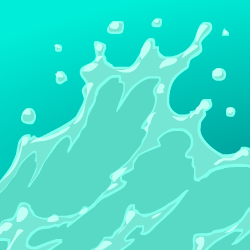
Fig. 2 - standard feature film water splash
In the world of quota-driven, cost-cutting splashes, at least two water colours are chosen: a base colour and something a bit lighter, as seen in Figure 2. It's common for the linework of a splash to be coloured with its own variation on the base colour, usually lighter to give a soft edge. Add a layer of highlights and the effect is approved and paid.
In any 2D feature film from the past million years, especially from the major studios, you'll be hard-pressed to find a splash that doesn't fit this formula.
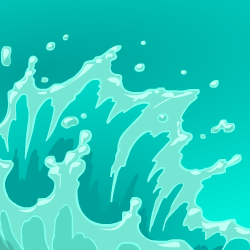
Fig. 3 - A slightly higher standard.
Additional to the above standard treatments, you'll occasionally come across a splash with an extra colour or two, designed to give depth or volume to the water. This can take the form of a shadow, a sheen or a gradient. Sometimes all of these are used. The more colours, the more expensive the FX are, because each additional colour needs to be animated with the water. If a basic splash takes an hour to animate, then adding and animating several layers of depth certainly adds additional hours. In Figure 3, a gradient and a shadow layer are used for extra volume.
As much as transparency makes sense, it really can ruin a splash if handled clumsily. As we've seen in other articles, when you can see through an effect, you should be able to see other parts of the effect on layers behind. If you can't, then the whole effect appears fake, which is exactly the opposite of the FX department mission statement!
If you're going to add transparency to a standard 3-4 colour splash like those in figures 2 and 3, I suggest you apply it to the middle-range main body colour only. Even better is a gradient that is part solid and part transparent, although animating gradients frame-by-frame can be tedious and a bit hit-and-miss. But by all means, try it!
This is my own method of 2D splash treatment. It's well suited to most clear water splashes but be warned, it's very time consuming because every last piece of airborne water is refracting the background and reflecting the light. The results however speak for themselves.
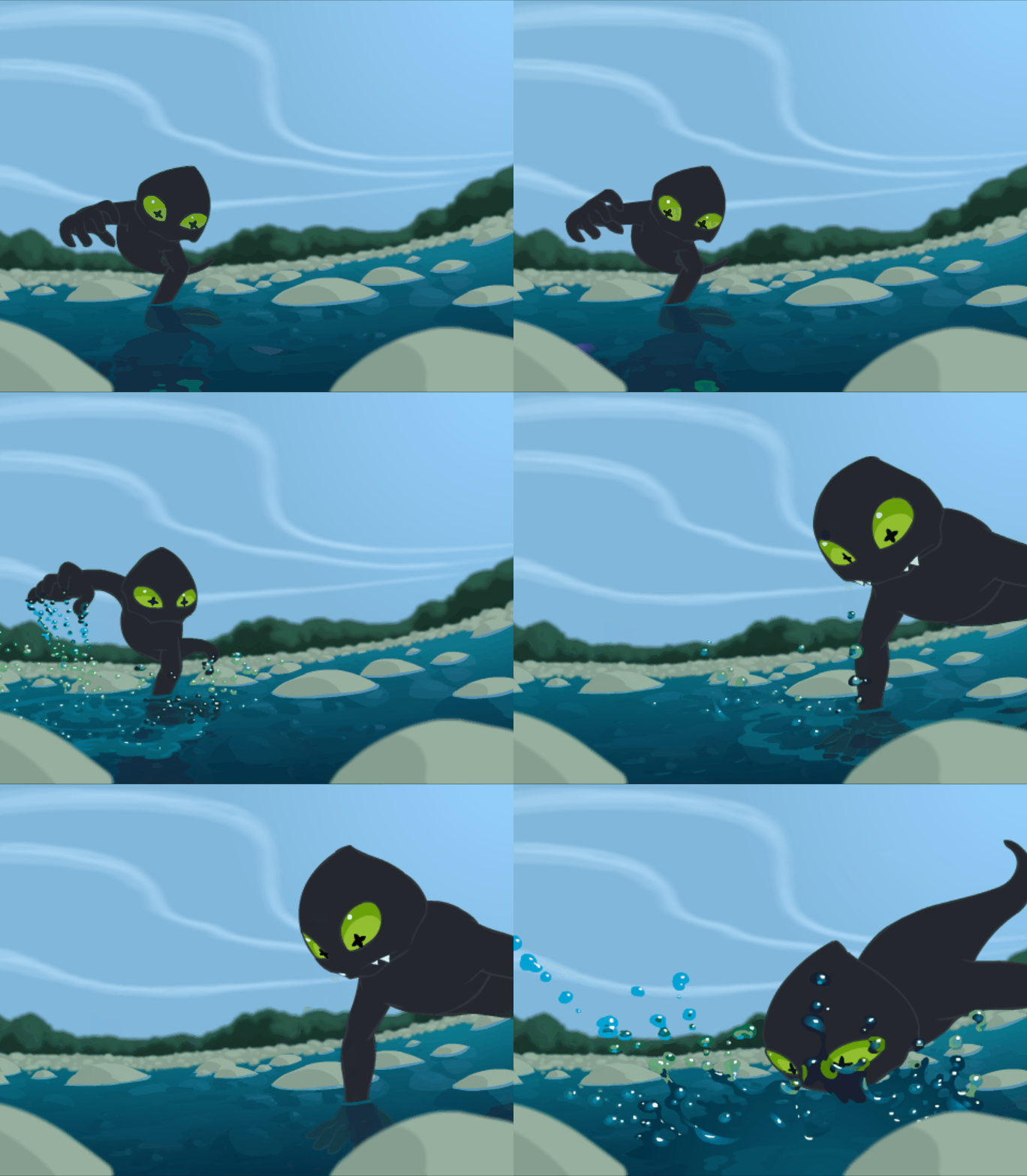
This is the kind of thing I never had the freedom to do in an animation studio I guess you could say that being held back was my motivation for developing and using this technique in my own work.
Since switching from Flash to Toon Boom Harmony, I have since developed ways to streamline this effect using effects nodes, eliminating much of the frame-by-frame refraction painting.
Whatever the liquid, a splash is an extremely complex effect. Understanding the forces that control the look and behaviour of liquids is crucial to good animation. So far you've learned about wave motion, surface tension, light, shadow and reflection, all of which play an important role in a splash. In a future article we'll be studying refraction, which will help you realistically animate and render clear liquid, like water.
In this article you've seen the thought process behind designing a proper water splash, animating it and treating it. Water isn't something you can learn quickly, nor are there any shortcuts for mastery of this technically intricate effect. But I hope this article, and those previous leading up to this one, can help put you on the road facing the right direction.
Easy - Design 6 stages of a splash starting from impact, through to splashdown.
Intermediate - Design and animate TWO separate splashes for the same object.
Advanced - Design and animate a splash with foreground and background sheet layers, with colours for splash edge, splash body and splash highlight. Take the animation all the way from initial impact to completion back to the surface.