This week we're studying an effect that's not only used for impact of a heavy object on a dusty surface, but it can be used to show impact in a wide range of situations. This visualisation of air turbulence also shares some similarities with explosions and splashes.
An impact causes a sudden displacement of air and we see particles riding the turbulence. What's interesting is that this turbulence exists whether or not we can see it. Air is invisible, but throw in some vapour, dust or smoke particles and that unseen force is suddenly revealed.
When air is displaced suddenly, it initially moves quickly with definite direction. However, as if hitting a very soft wall, everything slows down and almost immediately becomes a gradual process of dissipation and settling.
Note: The commonly used term "dissipate" brings to mind the idea that the dust clouds somehow break down into nothing, which is not true. Clouds of dust particles break up, spread, expand, thin, scatter and settle. Therefore, "disperse" might be a more suitable term.
When an impact happens, dust clouds are initially stretched and directional, then they slow down and form their cloudy shapes. Before we look at initial impact, let's first learn how to draw the fully developed clouds of dust.
A cloud is made of bazillions of tiny specks, but when roughing out dust animation, clouds are often visualised a cluster of a few roughly spherical components. This helps the animator think of the effect as manageable parts. We can keep track of these dustballs individually to ensure they expand and disperse properly.
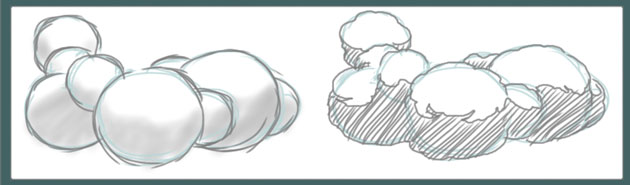
Dust construction as spheres
I encourage you to use the circle/sphere technique as much as possible. As you become more familiar with the design of cloudy shapes, you may "outgrow" the circles phase of construction and skip right to animating the outline of the entire effect. When you're just starting out though, it's the perfect method of breaking a complex effect down into manageable components.
Exercise one:
Design 3 completely different impact dust clouds, each consisting of no more than 6 spheres.
The danger that befalls many beginners is the dreaded popcorn effect. This is what happens when the animator develops a habit of repeating the same repetitious arc pattern around the entire cloud effect. Even when blurred, this design looks terribly unnatural.
When you're drawing the outline of your dust clouds, break it up with some controlled randomness.
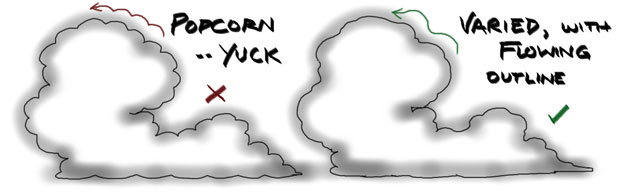
Left: regular, ugly "popcorn" design - Right: varied, natural, flowing line
The more violent an impact, the more direction you can see at the start of the effect. This is also the case in other effects, like explosions and splashes.
The sharp stuff really only occurs immediately after impact (see below, frames 1-3), then it soon slows into cloudiness (below, frames 5-17) on its way to dispersion.
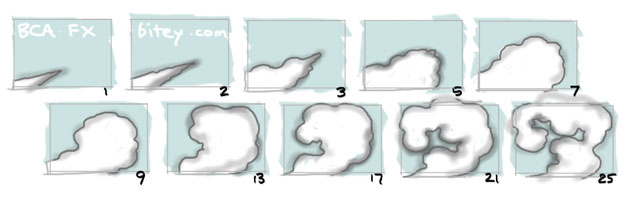
Most energy and therefore "pointy" direction is in the first few frames
Always remember, even though we work in 2D, what we're animating should have volume! In the early days of animation, dust was a solid colour and it usually dissipated by breaking up into smaller and smaller pieces. In these days of instant digital treatments however, a bit of transparency reveals that a single layer has absolutely no depth.
For this reason, it sometimes helps to put in a second or even third layer of dust to give a transparent cloud some depth and volume.
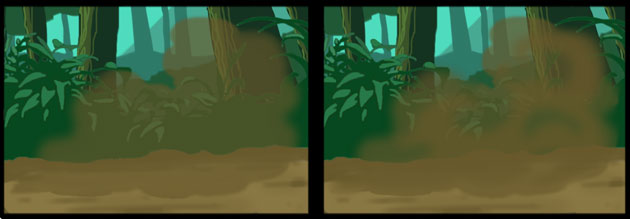
Left: consistent transparency reveals flatness - Right: The same dust cloud with another layer behind.
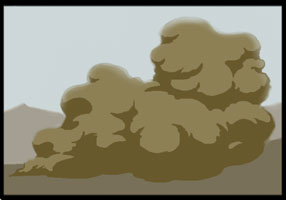
The classic two-tone design suggests density so it's often unsuitable for small scale impact dust.
The common way of giving volume to dust and smoke, and the classic look for cartoony dust, is a two-tone effect of light and shadow on the clouds (see left).
This is well suited for very heavy clouds like thick black smoke, or explosions. For simple cartoony dust though, a two-tone effect may be overkill with unnecessary line mileage.
It could also be unsuitable, especially if you're adding transparency.
Two-tone suggests density, while transparency suggests the opposite.
When treated with any transparency, the depth of a two-tone cloud is completely flattened, so the two are not often compatible.
In the world of cheap cartoons, dust is broken as quickly as possible into smaller and smaller blobs until there's nothing left. In scenes like that, you can almost hear the animator saying "phew, I'm glad that's over".
This method is dissipation in the true sense of the word (i.e. breaking down into nothing). For feature film quality dissipation, a skilled animator can produce some really beautiful, intricate results. If it's animated with patience and care, especially with the addition of gradually increasing blur and transparency, it can be stunning.
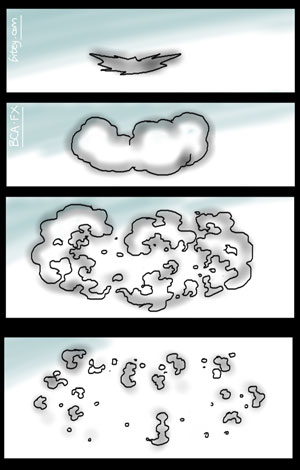
Exercise two:
As in the image (right), design FOUR frames of a dust effect's major stages with the dissipation method:
- Impact
- Billow
- Breakup
- Disperse
These drawings should be rough sketches at first, then the outline defined. You can see that I've created very rough shapes with a broad airbrush, then later added a solid line. This roughing technique will be demonstrated in the Timing section, below.
If we're talking realism though, dust clouds expand and break up as the particles disperse to a point where they no longer cluster as visibly dense, cloudy shapes. In fact, the dispersion of dust (should you stay around long enough to watch it) is more like a hanging mist that gradually settles.
The traditional "bitsy" dissipation of 2D dust can be very tedious to animate, but with digital tools come better ways of creating a realistic dust cloud. This realism happens to be much quicker and easier to animate because it has less "bits", and utilises morphing, blur and fading.
You'll see a demonstration of this fading/dispersion method in the next section.

Digital timeline and traditional timeline marked with keys and inbetweens
In the images below we can see the frame-by-frame sequence of key drawings, with the number of inbetweens marked on each.
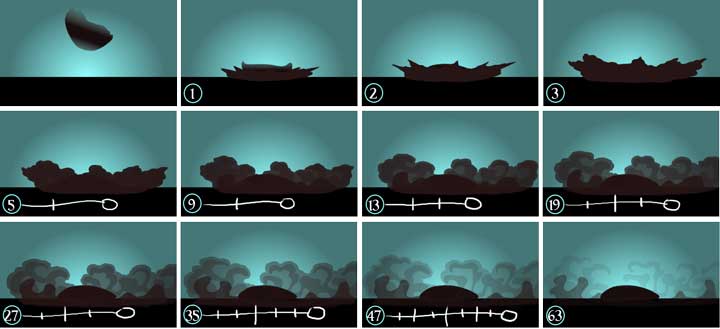
Dust keys with traditional animation timing tracks.
Undoubtedly, the most tedious, difficult and time-consuming part of the effect is the breaking up of the clouds. If you ever have to traditionally animate a dust cloud to complete dissipation, there usually comes a point where you wonder if you'll ever finish, particularly if you're doing your own inbetweening.
While traditional billow and dissipate skills are important basics to master, I always jump at the opportunity to use my depth and disperse method of dust animation, which is more about careful treatment of morphing, fading and blurring layers, treated with cutters and digital light effects.
The above video demonstrates the dissipate method, while the example below shows the disperse method.
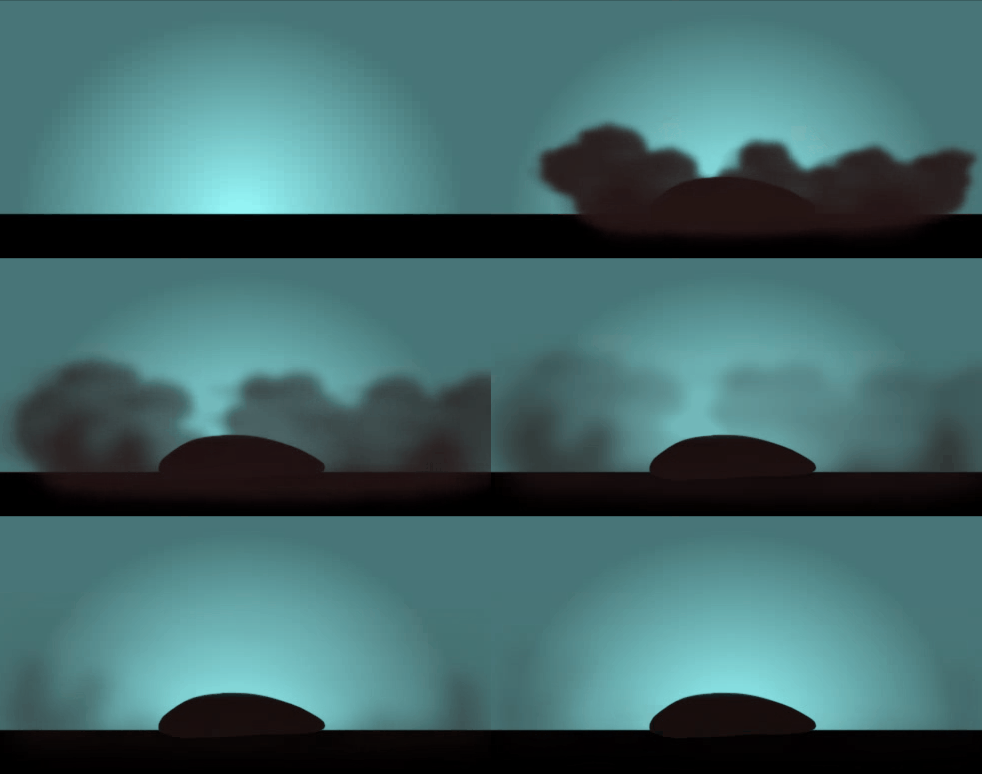
Exercise three:
Using spheres, or very rough construction lines, key out a top-down shot of an impact dust cloud ring. If you need a timing guide, you can use the frame numbers in the image below.
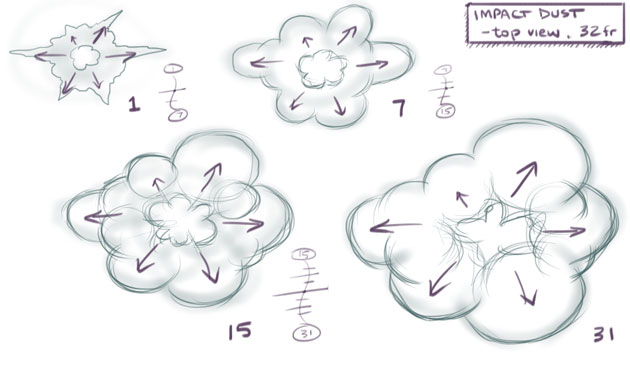
Example: Top view of impact dust using spheres construction
Dust, steam, vapour, fog, smoke and mist; all of these can benefit from out-of-the-box digital treatments in most animation programs today.
For any effect that is supposed to have depth and uses transparency, well thought-out layering is essential. As you saw in my disperse method, each of these layers may then be given its own unique treatment values. You would use at least two separate layers of dust, though for very large, or full-screen dust scenes, I'd recommend 3 or more layers. The following very useful tools and treatments make excellent work of any dust, steam, fog, vapour or smoke effect of this kind.
Depending on your experience or how comfortable you feel with this effect, choose a level below and try animating one of them. Please consider posting your progress and/or result in the BCAFX Discord.
I encourage you to be honest with yourself about your skill level. Only attempt the intermediate or advanced exercises if you can absolutely nail the beginner exercises. There's no rush here. Have fun with the beginner levels until you feel comfortable enough to tackle the intermediate and advanced stuff. A well-executed beginner exercise is much better than a naive stab at an advanced one.
Beginner: As demonstrated in the first video, animate a series of particles that streak out from an impact and swirl with turbulence as they slow down and settle.
Intermediate: As demonstrated in the second video, animate a series of spheres that streak out from the impact, growing as they travel along the ground. Keep each sphere on, or close to the ground throughout its expansion.
Advanced: As demonstrated in the third video, animate a puff of multi-layered dust from an impact of your choice. Choose to dissipate (fragmenting) or disperse (expand and fade), or a combination of techniques to achieve a specific look.
In this article we've covered the design and animation of a fairly standard FX animation task. Mastery of this effect signifies your crossing the threshold from dabbler to FX animator. Some say that with the conquering of impact dust comes the special knowledge of the entire universe and all her secrets. Or maybe I just said that and in my own head it sounded more profound than it is.