In this level we're taking a first look at fire by animating a steady
candle flame.
Fire animation is quite simple as a single small flame. It only gets
more difficult the bigger and "flamier" it is. Therefore, we'll start
with a quiet candle flame. The candle flame is a manageable slice of
physics and chemistry that can be studied and, when the day comes,
applied to larger scale flames. We'll look at the various aspects in the
following order:
What is it?
Design
Timing
Treatment
What is it?
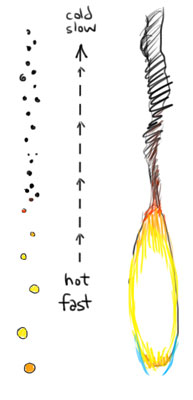
Glowing particles of combusting fuel rise upwards, emitting heat and
light, and eventually dying. These particles progress through stages
towards inevitable expiry. At the start, they glow brightly, and rise
quickly. But soon they lose their brightness and cool down. Just like
all of us huh?
When no longer glowing, they are simply tiny black particles moving
through the air. These "dead" particles of burnt airborne material, we
know as soot. Clouds of soot, we know simply as smoke
Design
When you look at a fire, there seems to be a lot going on and it can be
difficult to know where to start. The fact is that real world flames are
of such complexity that, as 2D animators, we need to simplify this
effect into a suitable 2D representation.
With that in mind, remember this: we need ONLY concern ourselves with
what glows. Flame animation is about nothing more than those glowing
sheets, ribbons and clouds of particles. Once they stop glowing, they're
invisible and we forget them.
What about the smoke, you say?
In order to apply separate digital treatments to fire and smoke (i.e.
glows and blur), it's necessary to animate the two effects on separate
levels/layers. When animating flames therefore, don't concern yourself
with the smoke. We'll animate that later.
Thankfully, a steady candle flame is one of the simplest forms of
combustion we'll ever need to animate. In fact, the steadier the flame,
the less animation. AND it can look just fine with minimal animation.
With the knowledge of what fire basically is, we are now armed with its
basic rules of behaviour. From here, we know what we're drawing with
each flame.
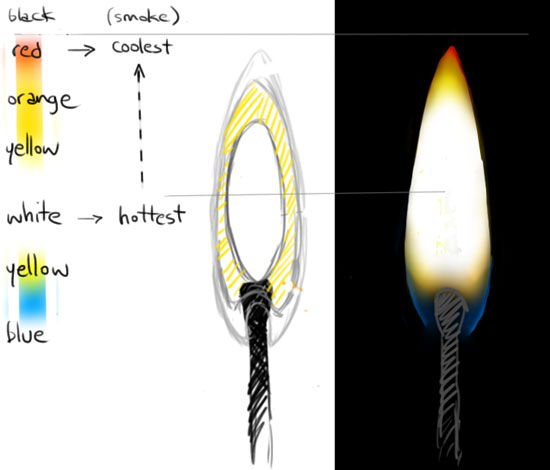
We have a better idea of where the fire is hottest, and therefore
brightest and fastest.
We know that heat determines the areas of colour
We know that, as flames move upwards, they must die and become
smoke.
The design process is not just a nailing down of how it looks, but how
that look is achieved. With the image of your finished product in your
mind, what elements will your flame require? Several layers? Which
layers have transparency, glows and blurs? Will the colours need to be
on separate layers for special treatment?
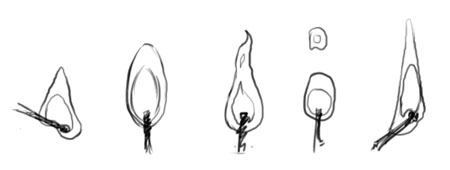
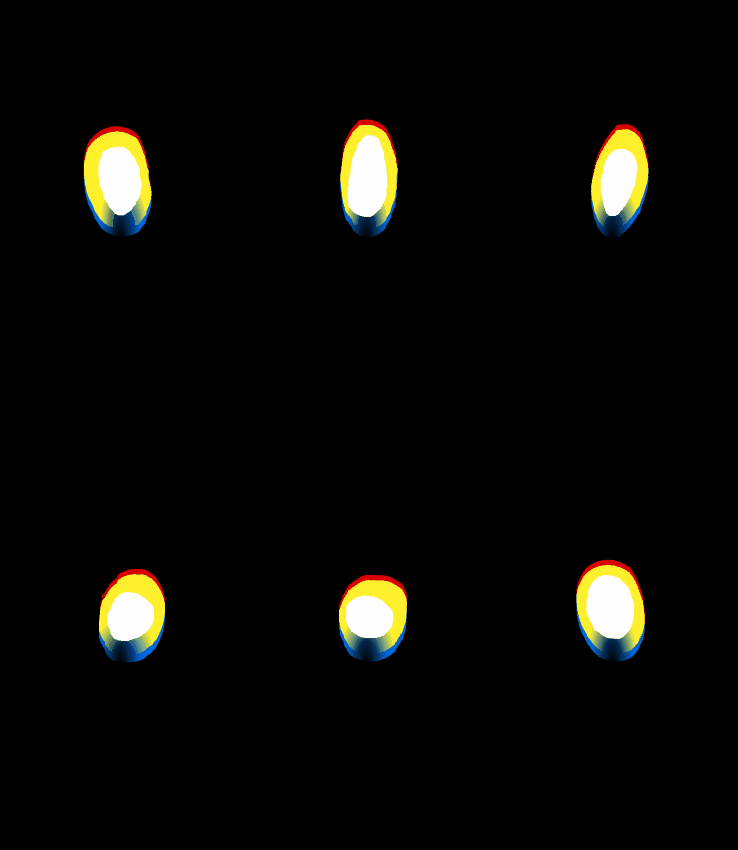
Several designs for small flames
Small flame construction and colour
Even steady flames have a variety of designs. Not all flames are pointy
at the top, waving around like flags. Some flicker, some pulsate, some
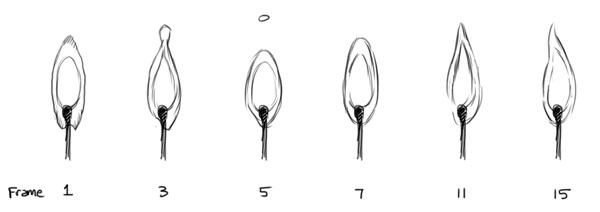
appear to breathe. Sketch out a few frames of flame poses to give yourself
(or your team) an idea of how this flame will move.
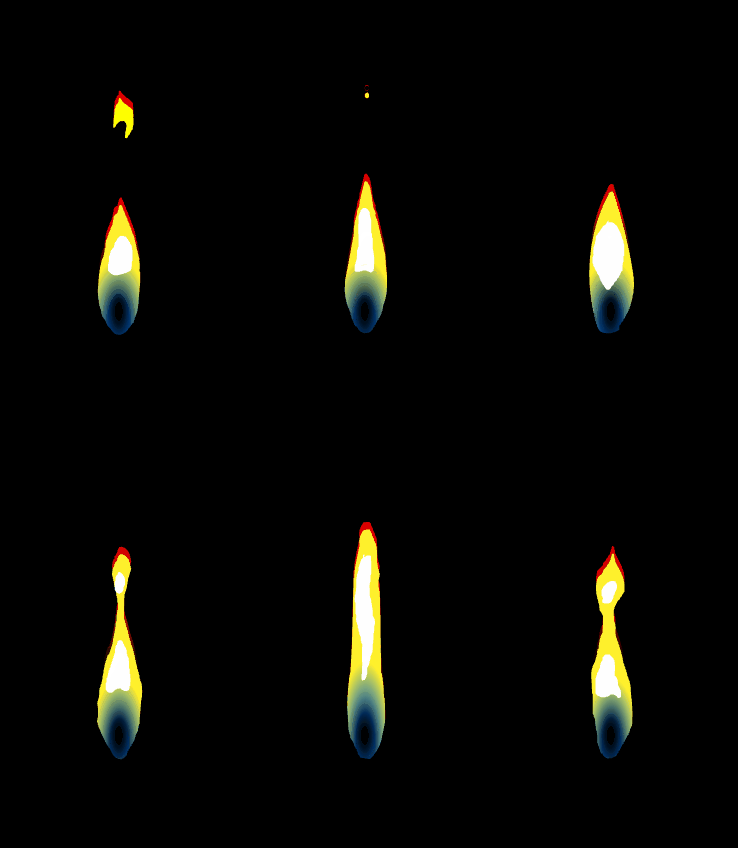
Small flame example animation sequence
Timing
Generally with a small flame such as that of a candle, simple is
better. Matches and candles have a steady, constant supply of fuel to
burn. Without a breath of wind a candle flame can appear motionless.
Despite this, animators often feel the need to make candle flames
flicker and dance constantly.
There's nothing wrong with having fun with your flame and making it do
interesting things, but just be aware of overkill and distraction. If
it's a romantic dinner for two, you probably don't want the candle flame
thrashing about stealing the scene.
Motionless
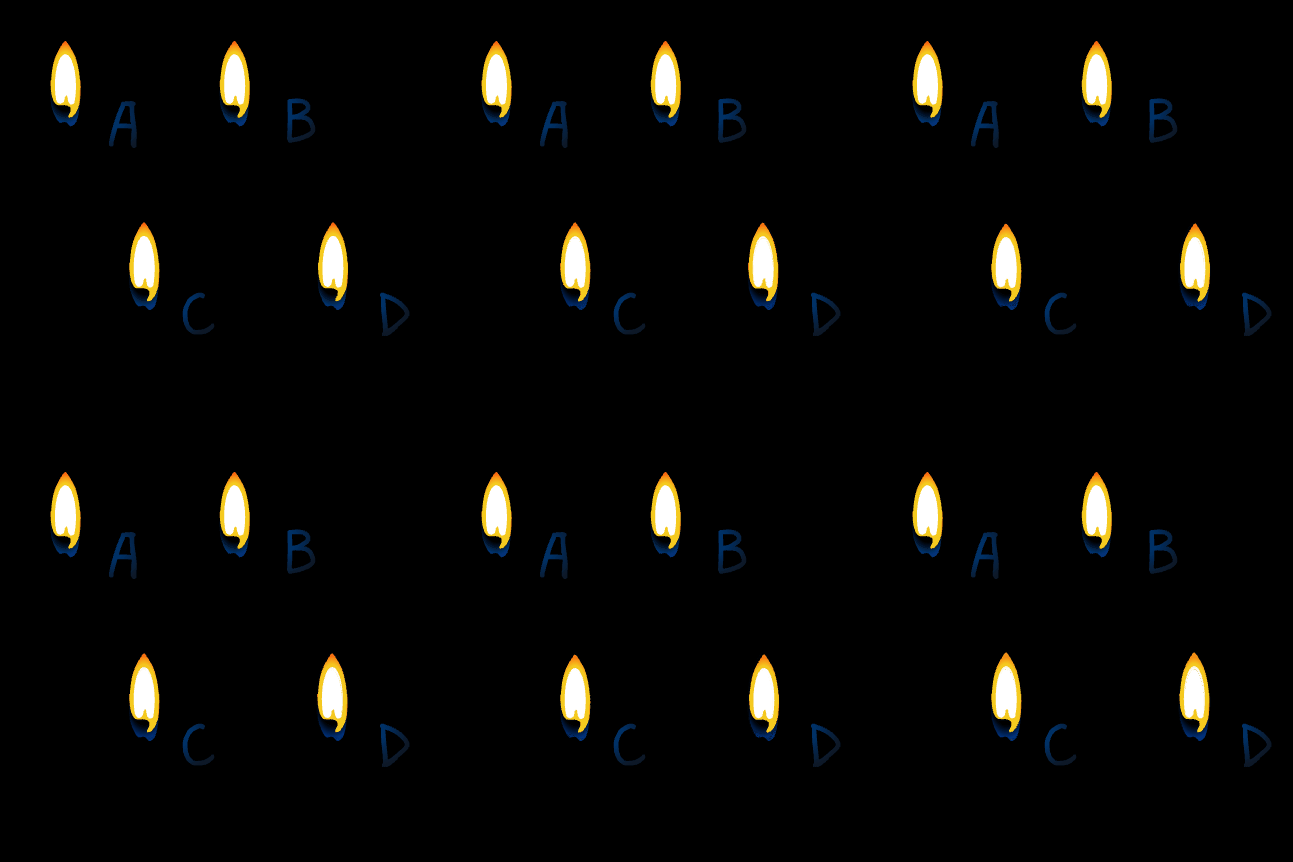
If you look closely at the flames to the right, you'll see three of them
moving:
(a) Completely motionless, (b) Keyframed glow (c) Up-down movement
(d) Gentle sway
Why not try a "less is more" scene where the flame is completely
motionless, but only the glow flickers or pulsates (see flame
B)? Simply keyframe your glow or directional blur values, rather than
animate the flame itself.
Steady
A quiet flame can be almost stationary for long periods of time, with
the occasional flicker, roll or change in height. Subtle Candle is a perfect example on YouTube. The
movement is so subtle at the start, you'll think the video isn't
playing.
A really nice touch would be to work with other things in the scene.
For example, in the romantic dinner scene, the flame could be almost
motionless until the man picks up his drink.. a slight pause before the
flame gently sways and resettles. Maybe the waiter arrives to stand at
the table.. another slight pause, then the flame dips and waves a little
more noticeably
Character animators breathe life into characters. FX
animators breathe life into the characters' world.
One very interesting flame effect is a kind of swaying roll (image
below). In fact, I saw it in action just today and was reminded to
include it here. The flame was a tea-light inside a decorative glass
tube. I don't claim to know exactly why this particular motion occurs,
but I guess it's the result of an air current reaching deep into the
tube and affecting the flame with a gentle circular turbulence.
Roll
One very interesting flame effect is a kind of swaying roll. In fact, I
saw it in action just today and was reminded to include it here. The flame
was a tea-light (short, squat candle) inside a decorative glass tube, so
perhaps this has something to do with the rolling movement; I don't know
exactly why this particular motion occurs, but I guess it's the result of
an air current reaching deep into the tube and affecting the flame with a
gentle circular turbulence.
Flicker
Now and then you'll see a flame that appears stuck in a perpetual loop of
rapid up-down movement, producing a flickering light, like some ancient
strobe. Here's
one on YouTube.
Again I don't know what conditions cause this behaviour, but my best
guess would be mere speculation. It seems to be more pronounced in very
still air, but it could be that it's simply less noticeable in more
draughty conditions.
Nevertheless, it's an interesting one for your mental library of flame
behaviour. Personally I'd be careful of this one as it's very distracting.
On the other hand, it may be a clever way to draw attention in a
particular direction!
Duck and weave
OK I could have called this one "squash and stretch" but this is a
pulsing, swaying and oscillating of complex flame movement when you walk
around the room holding a candle.
The duck and weave is an excellent exercise in flame animation and it's
a lot of fun. Even with such a small and simple flame design, it seems
no two drawings are the same.
Most important to be aware that a stretched flame should become thin,
or break apart. Remember the fuel source of a candle is released at a
constant rate. Also that when a flame breaks, that piece must continue
to rise. And on such a small scale, these broken pieces are especially
brief (as seen in the Flicker animation, above).
Treatment
Due to its translucency, the depth of a realistic 2D flame can be
achieved with levels, or layers. At its most simple, we have 1 or 2
colours for the flame. These may work best if treated with individual glow
or transparency values, so even a simple candle flame can have 2 layers.
For a fairly small on-screen flame, I'd be happy with a single layer, one
colour and a few very subtle digital tricks:
A miniscule amount of North directional blur (if any)
A very tight, subtle red, or deep orange glow
A broad, slightly flickering, yellow-white glow.
The closer to camera, from mid shot to extreme closeup, the more detail
I'd put in the flame, including:
A base flame layer containing the blues, yellows and reds.
A white hotspot layer with broad glow values applied.
A spectral aura (subtle red and green glows)
A broad yellow or white glow.
Assignments
Now let's put this in action. If you're confident, try one or more of the
following:
Frame rate: 24fps
Duration: 120 frames
Dimensions: 600x600px
Tasks: Beginner: Design 4-6 different candle flame types, and
animate as many of them as you wish Intermediate: Design and animate a traveling candle,
moving it around the scene. Have the flame reacting to the direction of
movement.
Summary
I hope you've enjoyed this lesson and have begun to appreciate what I
call "the simple complexities" of a candle flame! There will be more fire
and combustion effects in future lessons, including sparks, ignitions,
larger "torch" flames and campfires. Of course, if you like any of that,
you'll love the application of fire in magic effects.
Enjoy the exercises and please consider dropping by the BCAFX
Discord, whether it's to lurk, learn, post your work or offer
feedback to other members.