Before we visit the subject of this lesson's title, let's recap on a couple of basics.
As you well know film is a series of still images, each slightly different to the previous, displayed in rapid succession to achieve an illusion of movement. In filming live-action the camera captures a continuous strip of these images, called frames, as they happen. For example an action star throwing a punch or diving through a window may be captured as twenty or so individual images.
In 2D animation, the difference is that we create this series of images using 2D tools. We don't capture real life with film. We create the illusion of life individually, frame by frame.
One big challenge in film and animation is that of "strobing". When you have anything moving quickly on film, there's a gap between volumes causing a flickering effect. This is very noticeable, particularly in 2D animation. In the video below, I'm demonstrating the problem of strobing using a simple ball example.
video 45_strobe
As you saw in the video above, to compensate for strobing we in 2D animation normally stretch the volumes in the direction of travel. This is a very cartoony technique resulting in a very cartoony look.
Like I said in the video above, adding drawings in between will reduce strobing but that would mean increasing the framerate to compensate, which is a rare option. Another technique from animation's early days is known as multiple image, which I'll demonstrate for you in the next video.
video 45_multi
The multiple image effect is available in some 2D software, known as "motion trail". Flash has this effect buried in its "effect presets" menu, and ToonBoom's Animate Pro and Harmony have a motion trail module. If your software doesn't have these presets, you can easily recreate a multiple image effect by duplicating any layer, then offsetting its position and timing.
These days, to give 2D animation a slightly more realistic look, we use motion blur. This not only does the job of stretching the volumes out across the spaces between frames, thereby reducing strobe significantly, but it also lends a certain film-like realism. Any fast action taken on video or film almost always has a blur effect.
video 45_moBlur
When using motion blur, remember that the amount of blur is relative. If the camera is moving, for example swinging around fast to watch the passing of a speeding car, the entire scene will be blurred except the car (because the camera's following it). If the camera is fixed however, the car will have motion blur but the rest of the scene should not.
Finally, the title of this article! Here's an all-purpose technique that reduces strobe by filling gaps, stretching volumes and simulating blur. The name comes from the early days of animation where the painter uses a dry paintbrush to paint streaks on the acetate cels, though it's not necessarily achieved with paint on a dry brush.
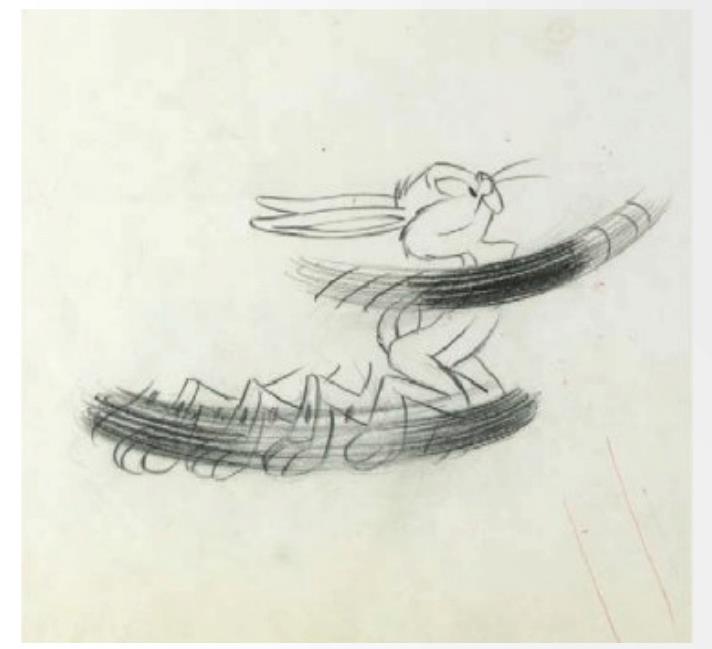
Fig. 1 - Drybrush combined with multiple image by Chuck Jones.
This technique was used for a vast number of motion effects but if you know 2D animation, think of anything with spinning leg animation (Speedy Gonzales, Road Runner, etc), wheel hubs, speed lines, fan blades, spinning swords, insect wings. All of these required some kind of streaky effect, similar to blur, that sells motion. In figure 2, we see the old style tornado effect, for which drybrush was the most suitable technique.
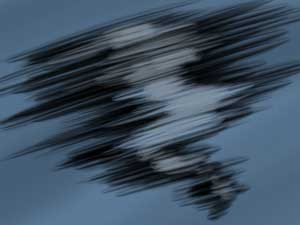
Fig. 2 - drybrush tornado
The drybrush technique is loaded with 2D charm but it's almost lost now due to the rise of digital tools that can quickly achieve more realistic motion effects. In compositing software today, motion blur filters are standard out-of-the-box tools, where spaces between drawings can be automatically filled with interpolated blur, requiring no drawing or painting.In today's world of entertainment, audiences take what they see in live action film as real life. To many, it feels like something's missing if the scene doesn't contain focal blur, motion blur or lens flares. Even hand-held camera motion is now routinely used in 3D and 2D animation to give an impression of realism!
We add a certain level of synthetic realism with these effects but in 2D, we're not fooling anyone; our audience knows that it's not "magic". The emphasis these days is on the art and technique, rather than any real illusion of life.